One message, several people
Pick up to 20 contacts and send each of them the same wishes, one chat at a time.
WhatsApp can't schedule messages on a computer. Submit Later can: write it now, choose the minute, and it's sent from WhatsApp Web right on time, even at midnight. To one person or up to 20, with photos and videos too.
Included in the free 30-day Pro trialThen ₹49 a month or ₹399 a year
Submit Later is a Chrome extension for computers. Open this page on your laptop or desktop to install it.
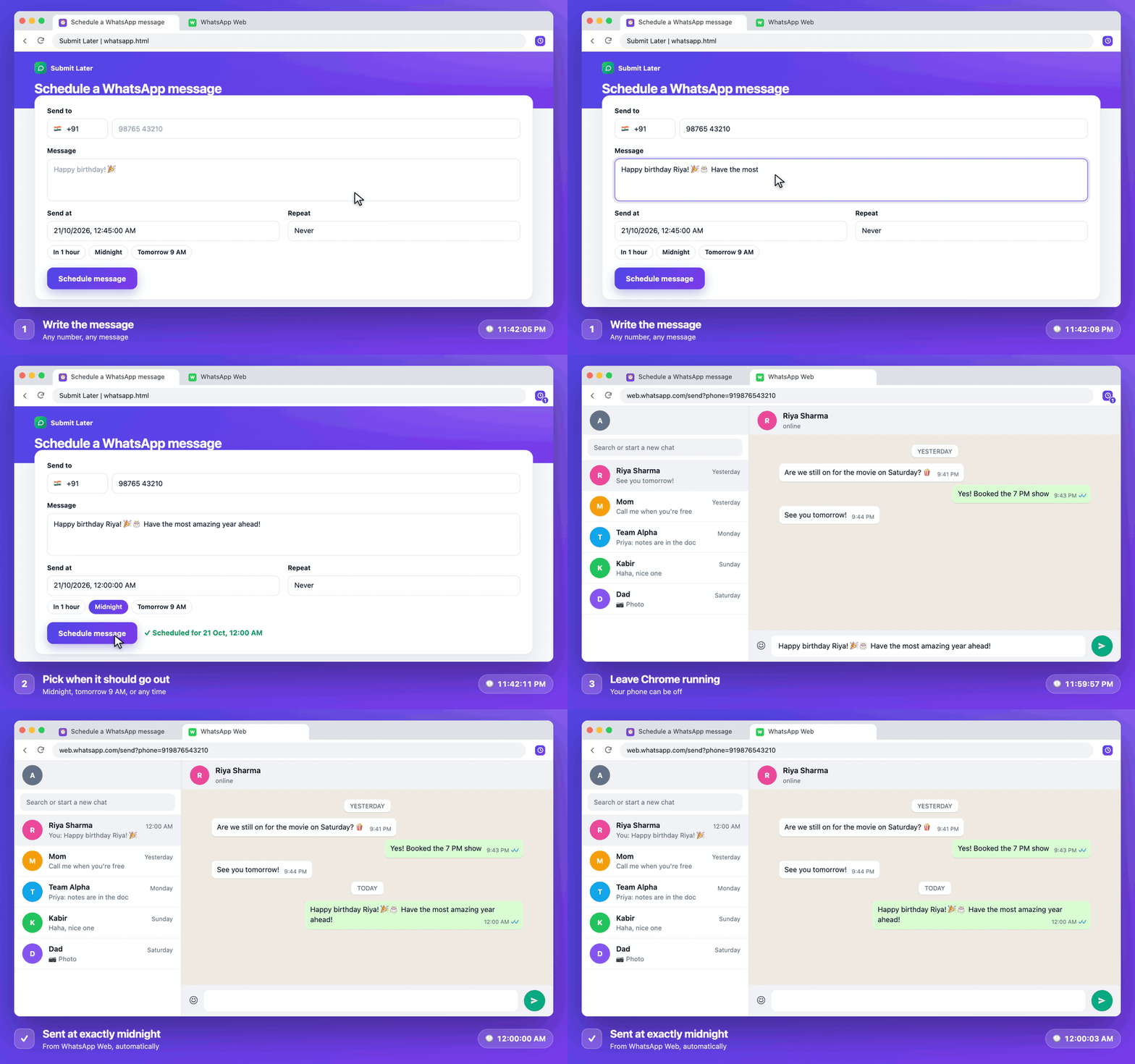
Click the Submit Later icon → Schedule a WhatsApp message. Search your contacts (import them once from your phone or Google Contacts) or type any number. Add up to 20 people, and up to 5 messages, photos or videos.
Midnight, tomorrow 9 AM, or any date and time. Repeat it daily, on weekdays or weekly if you like.
At the time, WhatsApp Web opens the chat and your messages are sent. Several people get it one by one, 20–45 seconds apart. You get a notification with the result.
Pick up to 20 contacts and send each of them the same wishes, one chat at a time.
Up to 5 messages per person, sent in order, like "Happy birthday!" followed by a photo.
Attach a JPG, PNG, WebP or GIF photo, or an MP4, MOV, 3GP or WebM video up to 16 MB, with an optional caption.
A different message and time for each person, all set up on one screen. Handy for follow-ups and reminders.
Be the first to wish them at 12:00:00 sharp, without staying up.
Rent day, a dose of medicine, the school pickup: a message at the right moment.
Write it during your day, and it arrives during theirs, not at 3 AM.
Send the quote reminder or the "how did it go?" at a professional hour.
Repeat every day, so the family group never misses a good-morning.
The Monday plan to your team, every week, on repeat.
Diwali, Eid, Christmas, New Year: your wishes go out at the exact moment.
Tell a customer their order is ready, or a regular about today's offer, at opening time.
Fair use: Submit Later sends to one person at a time, like you would, 20–45 seconds apart, with at most 20 people per schedule and 100 messages a day. It's for personal and small-business messages to people you know, not bulk marketing, which breaks WhatsApp's rules and can get a number banned.
Yes. Export your contacts from your phone (Android: Contacts → Export; iPhone: Share contacts) or from Google Contacts as a .vcf or .csv file, and import it once on the WhatsApp page. Then just search a name. Duplicates are skipped, and Indian numbers without +91 are fixed for you.
Yes. Add up to 20 contacts or numbers to one message. They're sent one by one, 20–45 seconds apart, so it looks like you sending them yourself. The page shows when the last one will go out.
Yes. Add a photo (JPG, PNG, WebP, GIF) or a video (MP4, MOV, 3GP, WebM) up to 16 MB to any message; the text becomes its caption. You can send up to 5 messages per person, for example a text and then a photo.
Yes. Use the Batch tab: each row has its own contact, message and time, up to 20 rows at once. Cancel a single message or the whole batch from the scheduled list.
Up to 20 people per schedule and 100 WhatsApp messages a day. That keeps your sending close to what a person would do, so WhatsApp doesn't mistake you for a spammer.
No. WhatsApp Web works on its own once it's linked. Your computer needs to be on, with Chrome running and WhatsApp Web signed in.
Submit Later uses the tab you already have; it reloads to open the right chat and sends the message. If WhatsApp Web isn't open, it opens it.
Messages are sent to a phone number. For groups, use the regular button scheduler: open the group chat, type the message, pick the Send button and choose a time.
Yes: every day, every weekday (Mon–Fri) or every week. Cancel it any time from the extension.
WhatsApp scheduling is a Pro feature: ₹49 a month or ₹399 a year. Every new account gets 30 days of Pro free, no card needed. See pricing.
Yes. Imported contacts, numbers, messages, photos and videos are stored only in Chrome on your computer and are never sent to our servers. Photos and videos are deleted from the extension once they've been sent. You can delete all contacts with one click.
Try WhatsApp scheduling free for 30 days. No card needed.